Material Usage Tracking
Key Concepts
Printago records how much filament every print actually consumed: per color, per slot, per attempt. The numbers come from analyzing the sliced G-code itself, layer by layer, so a print that stopped partway is charged only for the layers it actually ran, and an object you skipped is charged only up to the layer it was skipped at. Each attempt keeps its own record alongside the slicer's original estimate, so you can always see predicted versus actual for any print, including the ones that didn't finish.
You'll see these numbers in the Material used section of the Print Telemetry panel, in the Material usage recorded notification, and in the print-history API. With the Filament Stock add-on, the weight each print used also comes off that filament's stock, which stops at 0 g.

How usage is measured
When a job is sliced (or dispatched with an already-sliced file), Printago analyzes the G-code and builds a map of how much filament every layer uses, broken down by slot and, where the slicer marked them, by object. That map is what usage is measured against:
- A print that finishes is recorded at the slicer's own totals for the plate, per slot.
- A print that stops early, whether it failed or was cancelled, is charged only for the layers it completed. Printago takes the last layer the printer reported and sums the filament up to that point.
Totals are tracked in millimeters of filament and converted to grams using the density figures from the filament profile the plate was sliced with. If a profile doesn't supply a weight, that slot's usage is shown as a length instead of a weight.
Purge, prime tower, and flush filament is always counted in the totals. It isn't attributed to any particular object, because the printer extrudes it regardless of which objects end up printing.
Skipped objects
Skipping an object stops its filament from being counted from that point on. A skipped object is charged only up to the layer where it was skipped:
- Skipped at print start (excluded before the first layer): the object contributes nothing to the total.
- Skipped mid-print: the object is charged for the layers it printed before the skip, and nothing after.
This applies no matter where the skip came from. Objects skipped from Printago, from the printer's own screen, or from the Bambu app are all detected and accounted the same way.
Each attempt's print history record also stores how much filament the skipped objects would have used. So when a print's total comes in under the slicer's estimate, the record explains itself: the estimate assumed the whole plate, and the difference is sitting in the excluded amount.
Attributing filament to individual objects relies on the slicer labeling objects in the G-code, which OrcaSlicer and Bambu Studio do by default. If a skip can't be matched to an object in the G-code, Printago counts that filament as used rather than guessing at a deduction.
Cancelled prints
Cancelling a print from Printago records the filament used up to the layer the print reached, exactly as if the print had been stopped at the printer. Objects that had been skipped by that point are deducted the same way as on any other print.
A job cancelled before it ever started printing records no usage. If a print stopped but the printer never reported which layer it reached, Printago records the attempt with its details marked unknown rather than inventing a number.
Per-slot and per-color breakdown
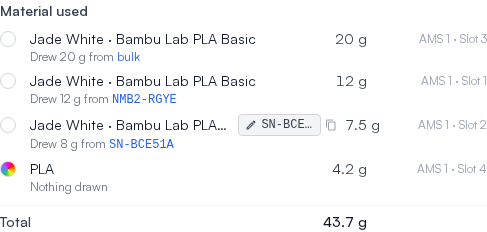
Usage is recorded against the physical slot the filament actually came from: a specific AMS slot or the external spool. At the end of the print, Printago also snapshots which material was loaded in each of those slots, so the record stays accurate even if you later swap spools or reassign materials. That's what lets the Material used section show "Bone White · Bambu Lab PLA Matte, 12.4 g, AMS 1 · Slot 2" long after the spool has moved on.
Which spool a print used
The snapshot also names the physical roll. If the slot had a spool serial, whether the printer read it off the roll's RFID tag or it came from the tracked roll loaded in the slot, that serial is recorded on the attempt alongside the grams, per slot. A multi-material print records the right serial for each slot separately.
That turns the record around: instead of only asking "what did this print use", you can ask "which prints used this roll". Click a serial anywhere it appears (the Material used list, the Printer Materials dialog, or the spool burn-down on the Materials report) to open the spool trace: every print off that roll, newest first, with the printer, slot, outcome and grams, and an Export CSV button.
A roll with no serial records nothing rather than a blank, so it can never be mistaken for a roll whose serial was lost. Because print history is never rewritten, prints finished before a roll's serial was known do not gain one.
What a print drew from stock
With the Filament Stock add-on, each row under Material used on a job also says what that slot took out of stock: "Drew 38.4 g from bulk", or from a tracked spool named by its serial or label code. When the stock held less than the print used, the row adds what was used, for example "Drew 30 g from A1B2C3D4 · used 42.4 g". A slot that took nothing out of stock, such as one set to a material type with no color, says "Nothing drawn". Where it drew from links to that filament's activity, opened on the spool when it was one. A spool is named as it was when the print drew it, so renaming or deleting it later leaves the job as it was. Without the spool-tracking add-on, a slot that drew a spool says "Drew 30 g from a roll", without naming or linking it.
Retries and estimates
Every attempt gets its own usage record. Retrying a job never overwrites the previous attempt's numbers, so a failed run's partial usage sits next to the successful run's full usage.
Each history record also snapshots the slicer's estimate from the time of the print: estimated total weight, estimated per-filament usage, and estimated print time. Actual and estimated live on the same record, which is what makes usage useful for spotting drift between what the slicer predicts and what your printers really consume.
Where the numbers appear
- Print Telemetry panel: open any finished job from the Print Queue to see material used per color and slot, the total, and any skipped objects. See Print History & Telemetry.
- Notifications: the Material usage recorded event (under Settings > Account > Notifications) fires when a print reaches any final state and includes the amount used, layers completed, and outcome. Webhook payloads additionally include the full per-slot breakdown and the excluded amount for skipped objects.
- API: the
print-historyendpoints return every attempt with its actual usage, per-slot breakdown, skipped objects, and the slicer estimate snapshot, and support filtering on the totals. See the developer docs.
With the Filament Stock add-on, a finished print takes what it used out of the filament's bulk stock, or, with the spool-tracking add-on, out of the tracked spool loaded in its slot. Without Filament Stock, recorded usage changes no remaining weight in Printago. Either way, the most-empty and most-full spool selection strategies use the remaining amount reported live by the printer (AMS/RFID), not Printago's records.