Filament Stock
Filament Stock is an add-on, turned on for your store by request. Tracking individual spools is a further add-on on top of it.
Key Concepts
Filament Stock is how much filament you have, filament by filament. Most shops buy by the box and never label a roll, so stock is kept as a weight per color rather than as a list of spools: receive six kilograms of Bone White and the page says six kilograms, with no spool records to manage.
Every print is recorded. When a print finishes, the filament it used comes off that filament's stock, and the draw-down names the part and the print that caused it, so any drop can be traced back to the job.
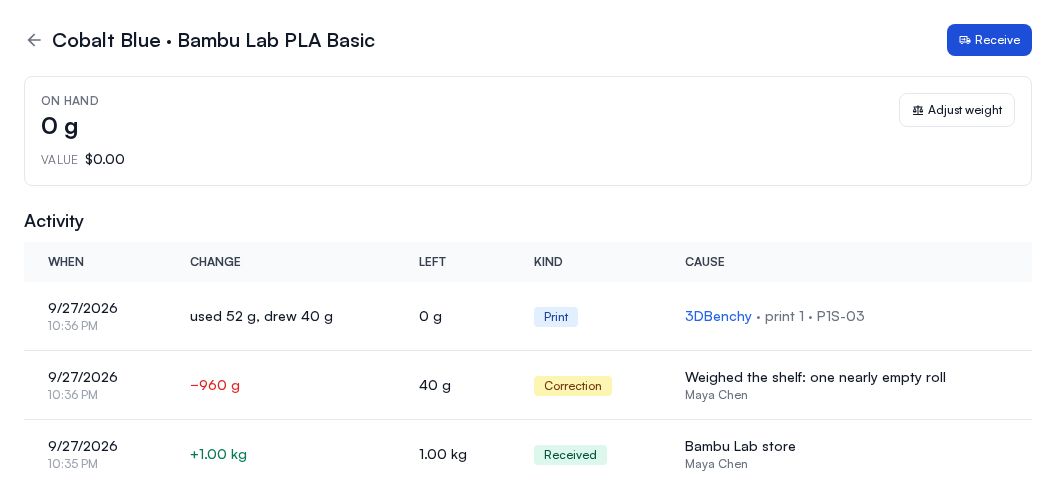
Stock never goes below 0 g. If a print uses more than the stock holds, the stock goes to 0 g and the activity row shows both figures: what the print used and what it drew. A filament you print with before ever receiving it appears at 0 g, with its prints listed, so you can see what it has been used for and correct it once you know what is on the shelf.
A print draws nothing when Printago cannot tell which filament it used: a slot set to a material type with no color, or a print whose weight could not be measured. The print still shows its grams on the job page, or "weight unknown".
The Filament Stock page
Open Filament Stock from the sidebar, under Printing. Each row is one filament (a material variant, like "Bone White · Bambu Lab PLA Matte") and shows:
- On hand: how much of that filament you have.
- Value: on-hand weight priced at that filament's price per kilogram (the variant's price, or the material's if the variant has none). Filament you have never priced shows a dash rather than a zero, and the Stock value total at the top counts only priced filament and says how many are unpriced.
- Last intake: when you last received it.
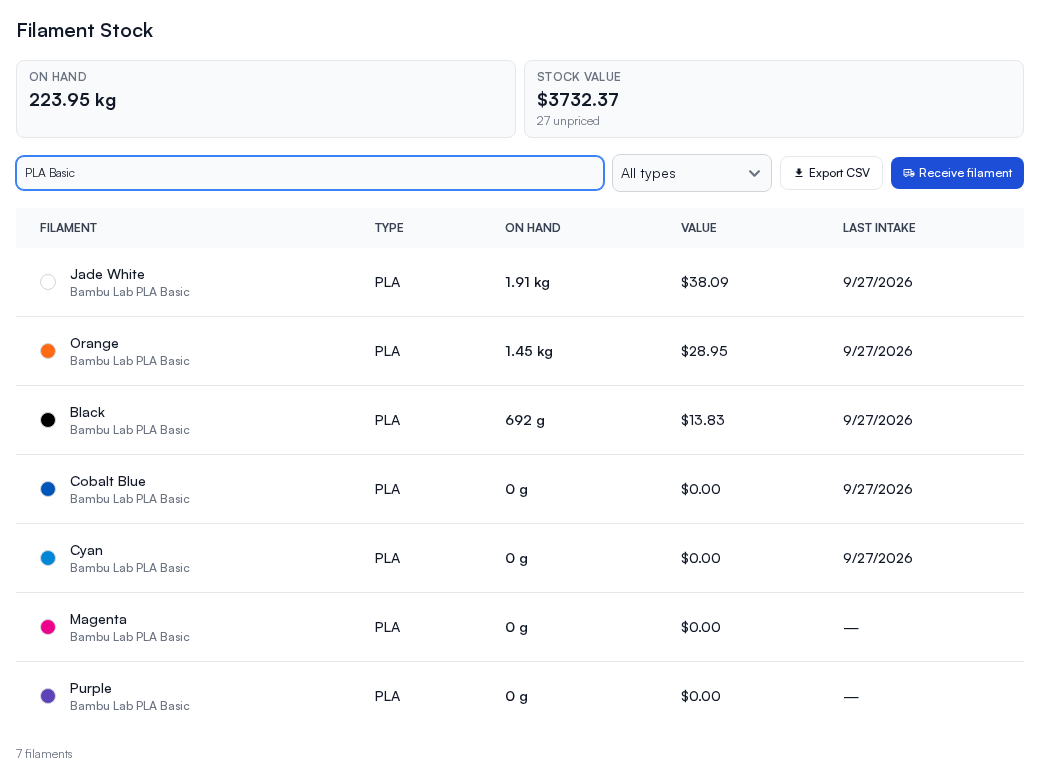
Search by color or brand, or filter by material type. Export CSV downloads whatever the filters are showing, for a stocktake or a spreadsheet.
With tracked spools, each row also splits on-hand weight into tracked spools and untagged bulk, and you can narrow the list to either.
Receiving filament
Receive filament records one delivery, however many filaments it contained. The filaments come from your Materials, so add a filament there before receiving it.
- Set the date received and, optionally, the supplier or order number.
- Choose how the delivery was priced: price per spool, or one total for the lot. A lot price is shared out across the lines by weight.
- Add a line per filament: which filament (listed by material, then color; opened from a filament's own page, the first line is that filament), how many, how much each roll weighs, and whether they are spools or refills.
- Tick Update the base price of these variants to what I paid if this delivery should become the filament's new price per kilogram. Left unticked, prices are unchanged.
The dialog totals the delivery as you go.
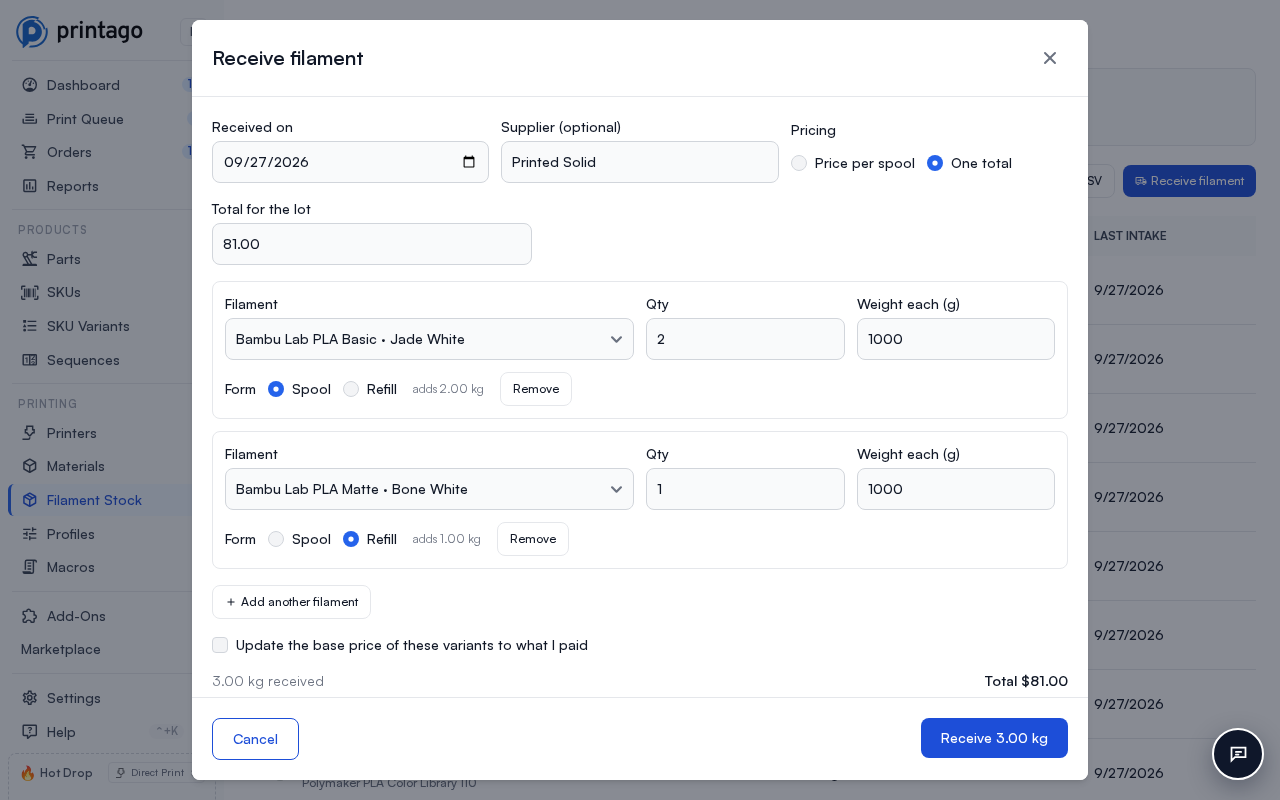
With tracked spools, tick Track individually on a line to create one spool record per roll instead of adding the weight to bulk. Each roll gets its own label code, the price you paid for it, and a Received row in the filament's activity naming the delivery.
Correcting stock
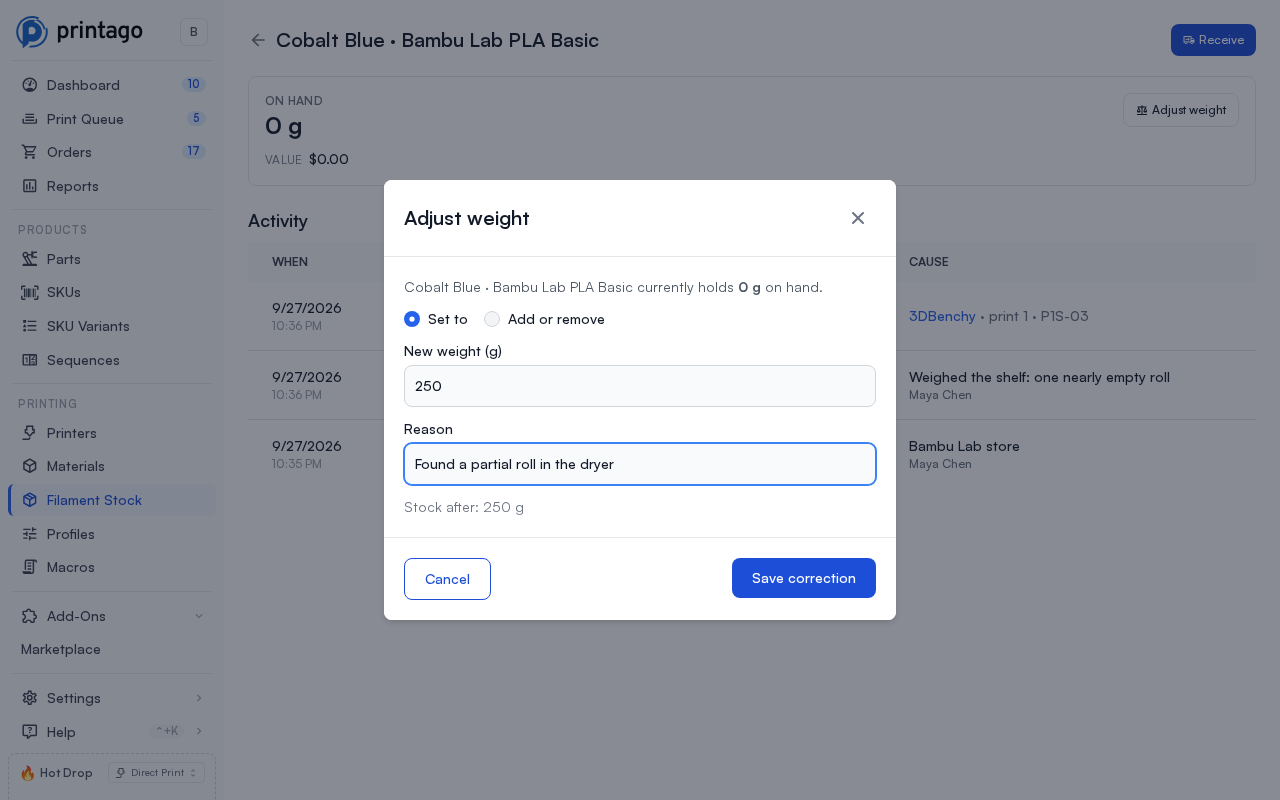
Adjust weight sets a filament to what is really on the shelf, or adds or removes a specific amount. It always asks for a reason, and a correction can't take stock below 0 g. Nothing is overwritten silently: the correction is recorded in the activity with your name against it.
Activity
Open a filament to see its stock and, below it, the Activity: every gram in and out, when it moved, what was left afterwards, and what moved it. The newest 50 rows show first; Show more loads the next 50.
- Received: a delivery, naming the supplier.
- Print: a print drew it down, naming the part, the print and the printer. When the stock ran short, the row shows what the print used beside what it drew, for example "used 38 g, drew 12 g".
- Correction: somebody adjusted it, with their reason and their name.
- Converted: bulk weight turned into tracked spools (with tracked spools).
See Material Usage Tracking for how the weight a print used is measured.
Tracked spools
With the spool-tracking add-on, a roll can have its own record, so you know how much is left on that spool and which prints used it. Every change to a roll's weight is recorded in the filament's activity, the same way bulk is.
A filament's page lists its Tracked spools: each roll's serial, the weight left out of what it held when full, its label code, what you paid for it, and the printer slot it is loaded in. A roll that reaches 0 g has run out: it leaves the list and no longer counts toward on hand. Seeing the list needs permission to view material instances; without it, the page still shows the tracked weight and count.
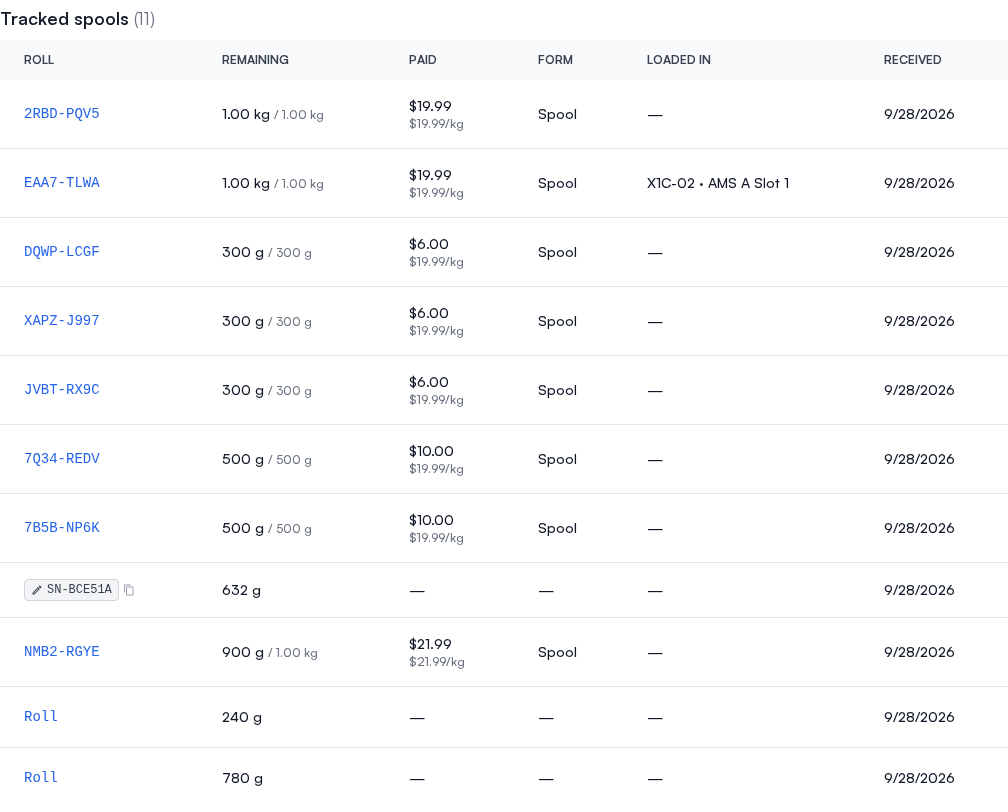
Where each roll's weight went
The activity lists bulk and every roll of the filament together, and the Stock column says which moved: Bulk, or the roll by its serial (or its label code when it has no serial). Select a roll, in the tracked list or in the activity, to see only that roll's rows; the roll's name appears above the list, and its × goes back to everything.
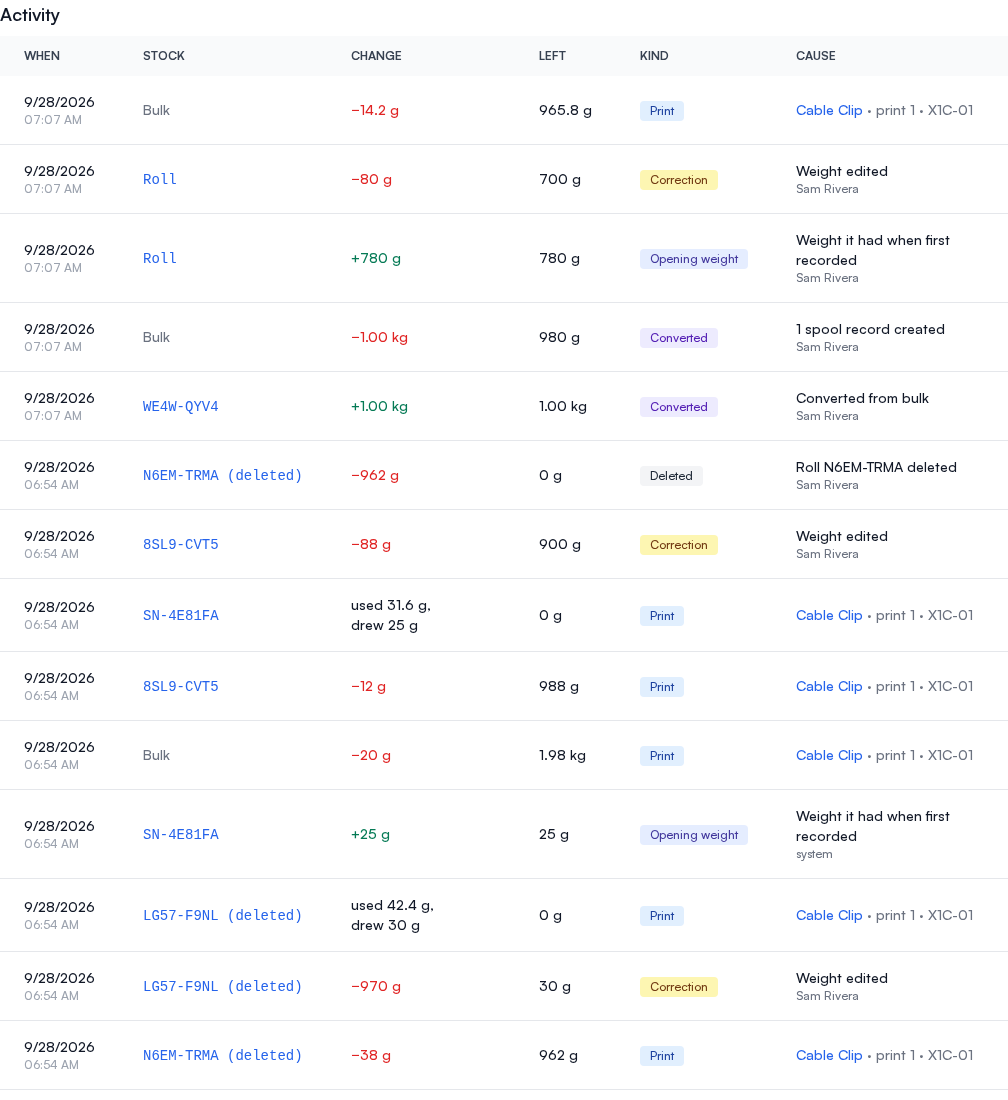
A roll's rows add up to the weight it has:
- A print on a slot holding the roll comes off that roll, never below 0 g. When the roll held less than the print used, the row shows both figures. A print that used two rolls, or a roll and bulk, records a row for each.
- Changing a roll's weight through the API records a Correction naming who made it.
- Deleting a roll that still has weight, also through the API, records a Deleted row taking that weight off. The roll's rows stay in the activity, still named by its serial or label code and marked "(deleted)".
- A roll made before you had Filament Stock, or added through the API, starts with an Opening weight row the first time its weight changes, so its history starts from what it held.
Without spool tracking, a print on a slot holding a roll comes out of the filament's bulk stock like any other print.
Converting bulk into spools
Convert to spools takes weight out of a filament's bulk and turns it into individual rolls, each holding a whole number of grams. The activity records the weight leaving bulk and each new roll arriving. You can't take more than bulk holds: the dialog says how much more you asked for and offers to Convert the number that fits, or to Adjust weight first. If someone else used that bulk while the dialog was open, it shows what is left and offers the same two ways out.
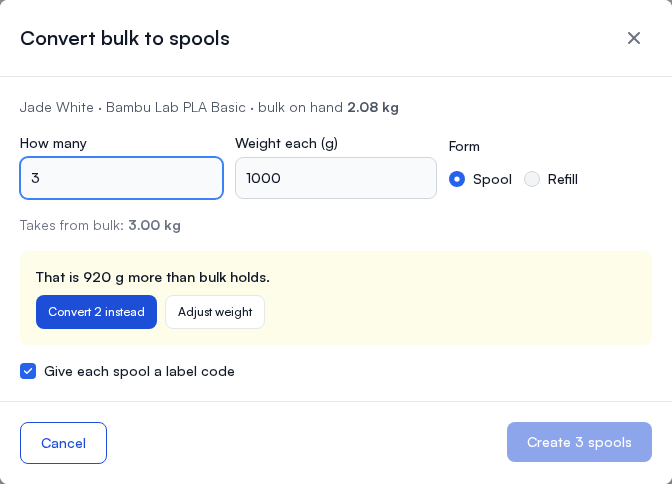
To put a tracked roll into a printer slot, open the printer's Materials dialog and use the Tracked spools tab. See Loading a tracked spool.